miércoles, 25 de agosto de 2021

EXCEL export html table


 <button id="btnExport" onclick="fnExcelReport();"> EXPORT </button>

function fnExcelReport()
{
    var tab_text="<table border='2px'><tr bgcolor='#87AFC6'>";
    var textRange; var j=0;
    tab = document.getElementById('headerTable'); // id of table

    for(j = 0 ; j < tab.rows.length ; j++) 
    {     
        tab_text=tab_text+tab.rows[j].innerHTML+"</tr>";
        //tab_text=tab_text+"</tr>";
    }

    tab_text=tab_text+"</table>";
    tab_text= tab_text.replace(/<A[^>]*>|<\/A>/g, "");//remove if u want links in your table
    tab_text= tab_text.replace(/<img[^>]*>/gi,""); // remove if u want images in your table
    tab_text= tab_text.replace(/<input[^>]*>|<\/input>/gi, ""); // reomves input params

    var ua = window.navigator.userAgent;
    var msie = ua.indexOf("MSIE "); 

    if (msie > 0 || !!navigator.userAgent.match(/Trident.*rv\:11\./))      // If Internet Explorer
    {
        txtArea1.document.open("txt/html","replace");
        txtArea1.document.write(tab_text);
        txtArea1.document.close();
        txtArea1.focus(); 
        sa=txtArea1.document.execCommand("SaveAs",true,"Say Thanks to Sumit.xls");
    }  
    else                 //other browser not tested on IE 11
        sa = window.open('data:application/vnd.ms-excel,' + encodeURIComponent(tab_text));  

    return (sa);
}


https://qastack.mx/programming/22317951/export-html-table-data-to-excel-using-javascript-jquery-is-not-working-properl

miércoles, 18 de agosto de 2021

How to call one shell bash from another shell bash?

    #!/bin/bash

    echo "This script is about to run another script."

sh ./script.sh
echo "This script has just run another script."
https://stackoverflow.com/questions/8352851/how-to-call-one-shell-script-from-another-shell-script

jueves, 12 de agosto de 2021

Linux Bash Loop with mysql

 #!/bin/bash

# sh_my_bach_run_this_loop.sh

for i in {1..5}

do

mysql -u USER -pPASSWORD -e "  delete from table where id = $i ;"

   echo "Welcome $i times"

done


... 

# add permission, run this on terminal

sudo chmod +x sh_my_bach_run_this_loop.sh

# run this on terminal

./sh_my_bach_run_this_loop.sh

miércoles, 11 de agosto de 2021

remove first character first line sed -i linux

Sed stands for Stream Editor which parses text files and used for making textual transformations to a file. 

The command specified to Sed, is applied on the file line by line. 

sed [options]\'{command}\' [ file name] 

sed -i \'s/{old value}/{new value}/\'  [ file name ]


 #!/bin/bash


# current date;

today=`date '+%Y%m%d'`;


# replace 60 first character from string on file with a " ;

sed -i 's/............................................................./,\"/g' list_$today.txt;


# replace '.pdf' from string on file with a " ;

sed -i 's/\.pdf/\"/g' list_$today.txt;


# replace " with ';

sed -i "s/\"/'/g"  list_$today.txt;


# remove first character first line on file;

sed -i '1s/^.//'  list_$today.txt;


# update info with the file modified

mysql -u USER -pPASSWORD DATABASE -e "


UPDATE TABLE_1 SET pdf= 1 WHERE folio in ($( cat list_$today.txt )) and pdf = '';

UPDATE TABLE_2 SET pdf= 1 WHERE folio in ($( cat list_$today.txt )) and pdf = '';


"


viernes, 6 de agosto de 2021

sudo crontab -e

One of the challenges (among the many advantages) of being a sysadmin is running tasks when you'd rather be sleeping. For example, some tasks (including regularly recurring tasks) need to run overnight or on weekends, when no one is expected to be using computer resources. I have no time to spare in the evenings to run commands and scripts that have to operate during off-hours. And I don't want to have to get up at oh-dark-hundred to start a backup or major update.

The crond daemon is the background service that enables cron functionality.

systemctl status cron


sudo crontab -e

# crontab -e

SHELL=/bin/bash
MAILTO=root@example.com
PATH=/bin:/sbin:/usr/bin:/usr/sbin:/usr/local/bin:/usr/local/sbin

# For details see man 4 crontabs

# Example of job definition:
# .---------------- minute (0 - 59)
# |  .------------- hour (0 - 23)
# |  |  .---------- day of month (1 - 31)
# |  |  |  .------- month (1 - 12) OR jan,feb,mar,apr ...
# |  |  |  |  .---- day of week (0 - 6) (Sunday=0 or 7) OR sun,mon,tue,wed,thu,fri,sat
# |  |  |  |  |
# *  *  *  *  * user-name  command to be executed

# backup using the rsbu program to the internal 4TB HDD and then 4TB external
01 01 * * * /usr/local/bin/rsbu -vbd1 ; /usr/local/bin/rsbu -vbd2

# Set the hardware clock to keep it in sync with the more accurate system clock
03 05 * * * /sbin/hwclock --systohc

# Perform monthly updates on the first of the month
# 25 04 1 * * /usr/bin/dnf -y updat

grep CRON /var/log/syslog
sudo chmod +x filename.bin

 https://opensource.com/article/17/11/how-use-cron-linux

jueves, 5 de agosto de 2021

npm ERR! electron@12.0.11 postinstall: `node install.js`

 npm ERR! code ELIFECYCLE

npm ERR! errno 1

npm ERR! electron@12.0.11 postinstall: `node install.js`

npm ERR! Exit status 1


Solution:

sudo npm install -g electron --unsafe-perm=true --allow-root


https://www.raspberrypi.org/forums/viewtopic.php?t=278846

Installing NodeJS on a Raspberry PI

curl -sL https://deb.nodesource.com/setup_10.x | sudo -E bash - 

sudo apt-get install -y nodejs 

Sometimes the folks supporting the builds have a glitch, and the ArmV6 version of the build doesn’t get published…. so it will complain with this message:

## You appear to be running on ARMv6 hardware. Unfortunately this is not currently supported by the NodeSource Linux distributions. Please use the ‘linux-armv6l’ binary tarballs available directly from nodejs.org for Node.js v4 and later.”

wget https://nodejs.org/dist/v10.15.3/node-v10.15.3-linux-armv6l.tar.xz tar xvf node-v10.15.3-linux-armv6l.tar.xz cd node-v10.15.3-linux-armv6l sudo cp -R bin/* /usr/bin/ sudo cp -R lib/* /usr/lib/ sudo apt-get update && sudo apt-get upgrade sudo apt-get install build-essential


https://bloggerbrothers.com/2017/03/04/installing-nodejs-on-a-raspberry-pi/

Enabling SSH

sudo systemctl enable ssh

sudo systemctl start ssh

ssh pi@[<em>raspberrypi_ip_address</em>]

###

Secure Shell (SSH) is a feature of Linux that allows you to effectively open a terminal session on your Raspberry Pi from the command line of your host computer.

Recent versions of Rasbpian do not enable SSH access by default.  You can use an empty boot file or raspi-config.

Using a blank boot file

For truly headless setups, if you can't ssh into your Pi you can't turn on ssh!

It's a bit of conundrum! But you can easily get around it by using a trick in Raspbian. To do so, we simply create a file called sshThis file does not exist by default and needs to be created. It can be empty. The system looks for it at boot time and will enable ssh if it is there. It is then deleted. So just create a new file and save it as ssh to the boot folder. If you plug the SD card into your computer, just put that ssh file directly in the SD card director's root directory

learn_raspberry_pi_sshfile.png

Using Raspi-Config

In order to do this, open LX Terminal on your Pi and enter the following command to start Raspi Config:

sudo raspi-config
learn_raspberry_pi_starting_raspi-config.png

Scroll down to the “ssh” option, it might be under Interfaces or Advanced (they move it around)

learn_raspberry_pi_raspi_config_ssh1.png

Hit the Enter key and then select “Enable”

learn_raspberry_pi_raspi_config_ssh2.png

A script will run and then you will see the following as confirmation:

learn_raspberry_pi_raspi_config_ssh3.png

You will need to reboot your Pi to make the change permanent


https://learn.adafruit.com/adafruits-raspberry-pi-lesson-6-using-ssh/enabling-ssh

domingo, 18 de julio de 2021

Manually Reinstall Ubuntu Grub Boot Loader


# ls /dev/sd*
# grub-install /dev/sda


https://www.tecmint.com/rescue-repair-and-reinstall-grub-boot-loader-in-ubuntu/

martes, 13 de julio de 2021

win 10 pro

 You can force install of Pro with a file:


Create a “ei.cfg” file containing the following text:
[EditionID]
Professional
[Channel]
Retail

Save the ei.cfg file to the \Sources folder on your Windows 10 installation media (USB flash drive).
Now when you clean install Windows it will install Pro.


https://answers.microsoft.com/en-us/windows/forum/all/installing-windows-10-pro-instead-of-home/fb62c4e8-8829-41ba-817c-aff3cca51b3b

lunes, 5 de julio de 2021

Bloquea los puertos USB de tu PC


Bloquea los puertos USB de tu PC

Regedit

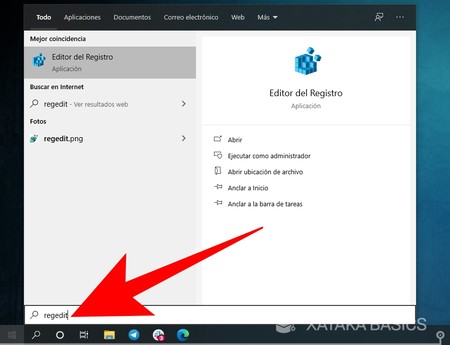
Lo primero que tienes que hacer es abrir el menú de inicio y escribir regedit. Como resultado, te aparecerá el Editor del Registro de Windows, y tienes que entrar en él para hacer los cambios que desactiven los puertos USB.

Services

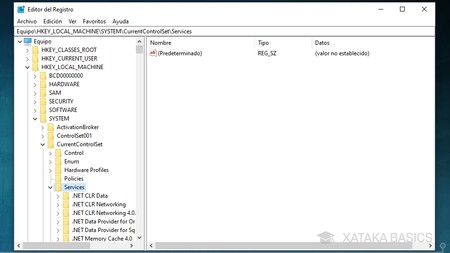
Se abrirá la ventana con el Editor del Registro. En ella, en la columna de la izquierda tendrás las carpetas por las que tienes que navegar hasta llegar a los elementos que quieras cambiar, los cuales aparecerán en la parte de la derecha. Aquí, tienes que llegar a la configuración de los USB, para lo que tendrás que navegar y llegar a la carpeta HKEYLOCALMACHINE\SYSTEM\CurrentControlSet\Services\UsbStor.

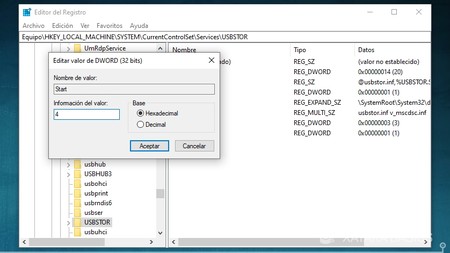
Una vez llegues a la dirección HKEYLOCALMACHINE\SYSTEM\CurrentControlSet\Services\UsbStor, en la parte derecha verás varios elementos diferentes. Aquí, tienes que hacer doble click sobre Start, que como verás en la columna Datos tiene por defecto entre paréntesis el valor 3.
Valor 4

Se abrirá una ventana en la que vas a poder cambiar el valor hexadecimal del campo Start. En esta ventana, cambia el valor 3 por el 4, escribiendo un 4 en su ligar, y aceptando. Ahora, reinicia el ordenador para aplicar los cambios, y los puertos USB quedarán inutilizados. Si te arrepientes, tendrás que volver hasta el campo Start y abrirlo para volver a poner el valor 3, que es el que activa los puertos USB.


https://www.xataka.com/basics/como-bloquear-puertos-usb-ordenador

martes, 29 de junio de 2021

EDIT ".gitignore"

https://www.toptal.com/developers/gitignore 

EDIT ".gitignore"

git rm -r --cached .

git add .


## .gitingnore example ---

## Ignore Visual Studio temporary files, build results, and

## files generated by popular Visual Studio add-ons.

##

## Get latest from https://github.com/github/gitignore/blob/master/VisualStudio.gitignore


# User-specific files

*.rsuser

*.suo

*.user

*.userosscache

*.sln.docstates


# User-specific files (MonoDevelop/Xamarin Studio)

*.userprefs


# Build results

[Dd]ebug/

[Dd]ebugPublic/

[Rr]elease/

[Rr]eleases/

x64/

x86/

[Aa][Rr][Mm]/

[Aa][Rr][Mm]64/

bld/

[Bb]in/

[Oo]bj/

[Ll]og/


# Visual Studio 2015/2017 cache/options directory

.vs/

# Uncomment if you have tasks that create the project's static files in wwwroot

#wwwroot/


# Visual Studio 2017 auto generated files

Generated\ Files/


# MSTest test Results

[Tt]est[Rr]esult*/

[Bb]uild[Ll]og.*


# NUNIT

*.VisualState.xml

TestResult.xml


# Build Results of an ATL Project

[Dd]ebugPS/

[Rr]eleasePS/

dlldata.c


# Benchmark Results

BenchmarkDotNet.Artifacts/


# .NET Core

project.lock.json

project.fragment.lock.json

artifacts/


# StyleCop

StyleCopReport.xml


# Files built by Visual Studio

*_i.c

*_p.c

*_h.h

*.ilk

*.meta

*.obj

*.iobj

*.pch

*.pdb

*.ipdb

*.pgc

*.pgd

*.rsp

*.sbr

*.tlb

*.tli

*.tlh

*.tmp

*.tmp_proj

*_wpftmp.csproj

*.log

*.vspscc

*.vssscc

.builds

*.pidb

*.svclog

*.scc


# Chutzpah Test files

_Chutzpah*


# Visual C++ cache files

ipch/

*.aps

*.ncb

*.opendb

*.opensdf

*.sdf

*.cachefile

*.VC.db

*.VC.VC.opendb


# Visual Studio profiler

*.psess

*.vsp

*.vspx

*.sap


# Visual Studio Trace Files

*.e2e


# TFS 2012 Local Workspace

$tf/


# Guidance Automation Toolkit

*.gpState


# ReSharper is a .NET coding add-in

_ReSharper*/

*.[Rr]e[Ss]harper

*.DotSettings.user


# JustCode is a .NET coding add-in

.JustCode


# TeamCity is a build add-in

_TeamCity*


# DotCover is a Code Coverage Tool

*.dotCover


# AxoCover is a Code Coverage Tool

.axoCover/*

!.axoCover/settings.json


# Visual Studio code coverage results

*.coverage

*.coveragexml


# NCrunch

_NCrunch_*

.*crunch*.local.xml

nCrunchTemp_*


# MightyMoose

*.mm.*

AutoTest.Net/


# Web workbench (sass)

.sass-cache/


# Installshield output folder

[Ee]xpress/


# DocProject is a documentation generator add-in

DocProject/buildhelp/

DocProject/Help/*.HxT

DocProject/Help/*.HxC

DocProject/Help/*.hhc

DocProject/Help/*.hhk

DocProject/Help/*.hhp

DocProject/Help/Html2

DocProject/Help/html


# Click-Once directory

publish/


# Publish Web Output

*.[Pp]ublish.xml

*.azurePubxml

# Note: Comment the next line if you want to checkin your web deploy settings,

# but database connection strings (with potential passwords) will be unencrypted

*.pubxml

*.publishproj


# Microsoft Azure Web App publish settings. Comment the next line if you want to

# checkin your Azure Web App publish settings, but sensitive information contained

# in these scripts will be unencrypted

PublishScripts/


# NuGet Packages

*.nupkg

# The packages folder can be ignored because of Package Restore

**/[Pp]ackages/*

# except build/, which is used as an MSBuild target.

!**/[Pp]ackages/build/

# Uncomment if necessary however generally it will be regenerated when needed

#!**/[Pp]ackages/repositories.config

# NuGet v3's project.json files produces more ignorable files

*.nuget.props

*.nuget.targets


# Microsoft Azure Build Output

csx/

*.build.csdef


# Microsoft Azure Emulator

ecf/

rcf/


# Windows Store app package directories and files

AppPackages/

BundleArtifacts/

Package.StoreAssociation.xml

_pkginfo.txt

*.appx


# Visual Studio cache files

# files ending in .cache can be ignored

*.[Cc]ache

# but keep track of directories ending in .cache

!?*.[Cc]ache/


# Others

ClientBin/

~$*

*~

*.dbmdl

*.dbproj.schemaview

*.jfm

*.pfx

*.publishsettings

orleans.codegen.cs


# Including strong name files can present a security risk

# (https://github.com/github/gitignore/pull/2483#issue-259490424)

#*.snk


# Since there are multiple workflows, uncomment next line to ignore bower_components

# (https://github.com/github/gitignore/pull/1529#issuecomment-104372622)

#bower_components/


# RIA/Silverlight projects

Generated_Code/


# Backup & report files from converting an old project file

# to a newer Visual Studio version. Backup files are not needed,

# because we have git ;-)

_UpgradeReport_Files/

Backup*/

UpgradeLog*.XML

UpgradeLog*.htm

ServiceFabricBackup/

*.rptproj.bak


# SQL Server files

*.mdf

*.ldf

*.ndf


# Business Intelligence projects

*.rdl.data

*.bim.layout

*.bim_*.settings

*.rptproj.rsuser

*- Backup*.rdl


# Microsoft Fakes

FakesAssemblies/


# GhostDoc plugin setting file

*.GhostDoc.xml


# Node.js Tools for Visual Studio

.ntvs_analysis.dat

node_modules/


# Visual Studio 6 build log

*.plg


# Visual Studio 6 workspace options file

*.opt


# Visual Studio 6 auto-generated workspace file (contains which files were open etc.)

*.vbw


# Visual Studio LightSwitch build output

**/*.HTMLClient/GeneratedArtifacts

**/*.DesktopClient/GeneratedArtifacts

**/*.DesktopClient/ModelManifest.xml

**/*.Server/GeneratedArtifacts

**/*.Server/ModelManifest.xml

_Pvt_Extensions


# Paket dependency manager

.paket/paket.exe

paket-files/


# FAKE - F# Make

.fake/


# JetBrains Rider

.idea/

*.sln.iml


# CodeRush personal settings

.cr/personal


# Python Tools for Visual Studio (PTVS)

__pycache__/

*.pyc


# Cake - Uncomment if you are using it

# tools/**

# !tools/packages.config


# Tabs Studio

*.tss


# Telerik's JustMock configuration file

*.jmconfig


# BizTalk build output

*.btp.cs

*.btm.cs

*.odx.cs

*.xsd.cs


# OpenCover UI analysis results

OpenCover/


# Azure Stream Analytics local run output

ASALocalRun/


# MSBuild Binary and Structured Log

*.binlog


# NVidia Nsight GPU debugger configuration file

*.nvuser


# MFractors (Xamarin productivity tool) working folder

.mfractor/


# Local History for Visual Studio

.localhistory/


# BeatPulse healthcheck temp database

healthchecksdb

martes, 8 de junio de 2021

PHP include() with GET attributes (include search.php?q=1)

$_GET['q'] = 1;

include('search.php);


https://stackoverflow.com/questions/5675550/php-include-with-get-attributes-include-file-phpq-1

jueves, 3 de junio de 2021

Want to show data in combo box from mysql table


       <select id = "EMPRESA" name="EMPRESA"  class="form-control">

      <?php  

$query = "SELECT * FROM table WHERE  col =  '$coordinador' ";

$result = $conn->query($query);


while($row=$result->fetch_assoc()){

    ?>

    <option value="<?php echo isset($row['EMPRESA']) ? $row['EMPRESA'] : ''; ?>"><?php echo isset($row["EMPRESA"]) ? $row["EMPRESA"] : ''; ?></option>

<?php } ?>

         </select>

    </div>

</div>


from : https://stackoverflow.com/questions/32606964/want-to-show-data-in-combo-box-from-mysql-table