mount new folder
sudo mount -o uid=1000,gid=1000 -t vboxsf YOUR_SHARE_FOLDER /home/linux/documents
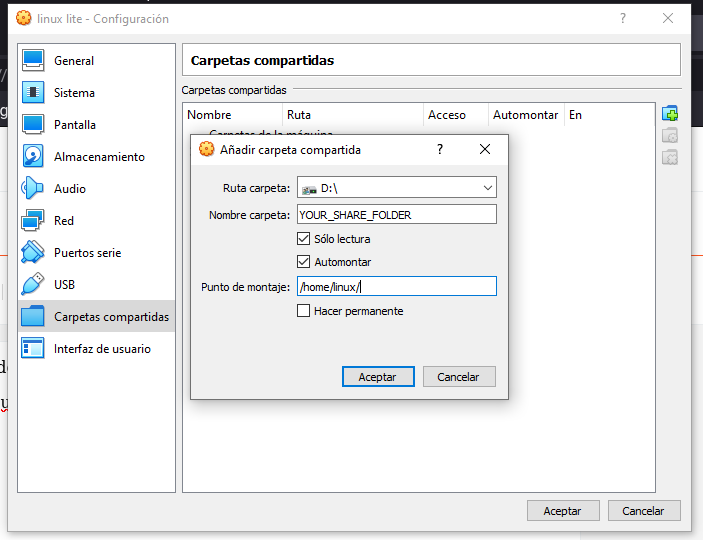
mount new folder
sudo mount -o uid=1000,gid=1000 -t vboxsf YOUR_SHARE_FOLDER /home/linux/documents

https://stackoverflow.com/questions/5471080/how-can-i-schedule-a-job-to-run-a-sql-query-daily
Chocolatey is a windows package manager meaning software can be installed through shell commands. This enables software to be installed, upgraded and uninstalled via scripts.
I’ve started to try using Chocolatey across my different devices in an effort to keep them in sync with the different programs. Although the commands must be run on the individual devices, it’s very helpful to have a list of packages installed which I’m maintaining in this post (see below).
Next time I set up a machine I’ll just need to follow the below instructions and let Chocolatey do much of the heavy lifting.
Chocolatey asks for confirmation before any install, although sensible this can become tiresome. To avoid this you can set a -y flag on every choco install command or set the following global chocolatey flag to make life easier.
choco feature enable -n allowGlobalConfirmationChocolatey seems to have a lot of the programs you may wish to
install but it’s not always obvious what the package name is. This is
where the search command comes in.
choco search <package>I’ve recently started to use the package search on the website instead as easier to find the relevant package. https://chocolatey.org/packages
Here is my list of packages that I usually install. I’ll be aiming to keep this list up to date so I’ve a reference of my installed packages as a gist.
| choco install 7zip |
| choco install autohotkey |
| choco install curl |
| choco install nodejs |
| choco install openssh --pre |
You can also see what packages you have installed with
choco list --localonlyTo check which packages are outdated but not perform any updates, run the following.
choco outdatedTo upgrade these outdated packages you can either upgrade a single package.
NOTE: upgrade is the correct command here, update is being depreciated in version 1.0
choco upgrade <package>or upgrade them all in a single command
choco upgrade allInevitably from time to time Chocolatey itself will need to be upgraded. The above commands will work but for reference, here is the command to only upgrade Chocolatey.
choco upgrade chocolateychoco uninstall <package>
https://richardballard.co.uk/chocolatey/
Usually searching an entire domain casts too wide a net, but if you are searching for government information, for example, you could search just within .gov sites by entering only the domain for the name. For example:
site:.gov seized property ohio
This site search is confined to all the websites in the .gov domain.
If you know the specific government agency, it is better to add it to filter your results further. For example, if you seek tax information results only from the IRS website, use:
site:IRS.gov estimated taxes
SET SQL_SAFE_UPDATES = 1;
UPDATE ERP.table_01 set id = '00000000-0000-0000-0000-000000000000' ;
https://stackoverflow.com/questions/11448068/mysql-error-code-1175-during-update-in-mysql-workbench
mysql -u USER -pPASSWORD my_DB_schema -e "select * from table" | mail -s "message header" my_mail_for_spam@gmail.com >/dev/null 2>&1
on cmd
mklink /D "<path-to-onedrive>\<name-of-new-folder>;" "<path-to-folder-to-be-synced>"https://www.soliva.es/como-agregar-y-sincronizar-carpetas-fuera-de-la-carpeta-de-onedrive/
<button id="btnExport" onclick="fnExcelReport();"> EXPORT </button>
function fnExcelReport()
{
    var tab_text="<table border='2px'><tr bgcolor='#87AFC6'>";
    var textRange; var j=0;
    tab = document.getElementById('headerTable'); // id of table

    for(j = 0 ; j < tab.rows.length ; j++)
    {
        tab_text=tab_text+tab.rows[j].innerHTML+"</tr>";
        //tab_text=tab_text+"</tr>";
    }

    tab_text=tab_text+"</table>";
    tab_text= tab_text.replace(/<A[^>]*>|<\/A>/g, "");//remove if u want links in your table
    tab_text= tab_text.replace(/<img[^>]*>/gi,""); // remove if u want images in your table
    tab_text= tab_text.replace(/<input[^>]*>|<\/input>/gi, ""); // reomves input params

    var ua = window.navigator.userAgent;
    var msie = ua.indexOf("MSIE ");

    if (msie > 0 || !!navigator.userAgent.match(/Trident.*rv\:11\./))      // If Internet Explorer
    {
        txtArea1.document.open("txt/html","replace");
        txtArea1.document.write(tab_text);
        txtArea1.document.close();
        txtArea1.focus();
        sa=txtArea1.document.execCommand("SaveAs",true,"Say Thanks to Sumit.xls");
    }
    else                 //other browser not tested on IE 11
        sa = window.open('data:application/vnd.ms-excel,' + encodeURIComponent(tab_text));

    return (sa);
}
https://qastack.mx/programming/22317951/export-html-table-data-to-excel-using-javascript-jquery-is-not-working-properl
#!/bin/bash
echo "This script is about to run another script."
sh ./script.shecho "This script has just run another script."https://stackoverflow.com/questions/8352851/how-to-call-one-shell-script-from-another-shell-script
#!/bin/bash
# sh_my_bach_run_this_loop.sh
for i in {1..5}
do
mysql -u USER -pPASSWORD -e " delete from table where id = $i ;"
echo "Welcome $i times"
done
...
# add permission, run this on terminal
sudo chmod +x sh_my_bach_run_this_loop.sh
# run this on terminal
./sh_my_bach_run_this_loop.sh
Sed stands for Stream Editor which parses text files and used for making textual transformations to a file.
The command specified to Sed, is applied on the file line by line.
sed [options]\'{command}\' [ file name]
sed -i \'s/{old value}/{new value}/\' [ file name ]
#!/bin/bash
# current date;
today=`date '+%Y%m%d'`;
# replace 60 first character from string on file with a " ;
sed -i 's/............................................................./,\"/g' list_$today.txt;
# replace '.pdf' from string on file with a " ;
sed -i 's/\.pdf/\"/g' list_$today.txt;
# replace " with ';
sed -i "s/\"/'/g" list_$today.txt;
# remove first character first line on file;
sed -i '1s/^.//' list_$today.txt;
# update info with the file modified
mysql -u USER -pPASSWORD DATABASE -e "
UPDATE TABLE_1 SET pdf= 1 WHERE folio in ($( cat list_$today.txt )) and pdf = '';
UPDATE TABLE_2 SET pdf= 1 WHERE folio in ($( cat list_$today.txt )) and pdf = '';
"
One of the challenges (among the many advantages) of being a sysadmin is running tasks when you'd rather be sleeping. For example, some tasks (including regularly recurring tasks) need to run overnight or on weekends, when no one is expected to be using computer resources. I have no time to spare in the evenings to run commands and scripts that have to operate during off-hours. And I don't want to have to get up at oh-dark-hundred to start a backup or major update.
The crond daemon is the background service that enables cron functionality.

# crontab -e
SHELL=/bin/bash
MAILTO=root@example.com
PATH=/bin:/sbin:/usr/bin:/usr/sbin:/usr/local/bin:/usr/local/sbin
# For details see man 4 crontabs
# Example of job definition:
# .---------------- minute (0 - 59)
# | .------------- hour (0 - 23)
# | | .---------- day of month (1 - 31)
# | | | .------- month (1 - 12) OR jan,feb,mar,apr ...
# | | | | .---- day of week (0 - 6) (Sunday=0 or 7) OR sun,mon,tue,wed,thu,fri,sat
# | | | | |
# * * * * * user-name command to be executed
# backup using the rsbu program to the internal 4TB HDD and then 4TB external
01 01 * * * /usr/local/bin/rsbu -vbd1 ; /usr/local/bin/rsbu -vbd2
# Set the hardware clock to keep it in sync with the more accurate system clock
03 05 * * * /sbin/hwclock --systohc
# Perform monthly updates on the first of the month
# 25 04 1 * * /usr/bin/dnf -y updat
grep CRON /var/log/syslogsudo chmod +x filename.binhttps://opensource.com/article/17/11/how-use-cron-linux
npm ERR! code ELIFECYCLE
npm ERR! errno 1
npm ERR! electron@12.0.11 postinstall: `node install.js`
npm ERR! Exit status 1
Solution:
sudo npm install -g electron --unsafe-perm=true --allow-root
curl -sL https://deb.nodesource.com/setup_10.x | sudo -E bash - sudo apt-get install -y nodejs
Sometimes the folks supporting the builds have a glitch, and the ArmV6 version of the build doesn’t get published…. so it will complain with this message:
## You appear to be running on ARMv6 hardware. Unfortunately this is not currently supported by the NodeSource Linux distributions. Please use the ‘linux-armv6l’ binary tarballs available directly from nodejs.org for Node.js v4 and later.”
wget https://nodejs.org/dist/v10.15.3/node-v10.15.3-linux-armv6l.tar.xz tar xvf node-v10.15.3-linux-armv6l.tar.xz cd node-v10.15.3-linux-armv6l sudo cp -R bin/* /usr/bin/ sudo cp -R lib/* /usr/lib/ sudo apt-get update && sudo apt-get upgrade sudo apt-get install build-essential
https://bloggerbrothers.com/2017/03/04/installing-nodejs-on-a-raspberry-pi/
sudo systemctl enable ssh
sudo systemctl start ssh
ssh pi@[<em>raspberrypi_ip_address</em>]
###
Secure Shell (SSH) is a feature of Linux that allows you to effectively open a terminal session on your Raspberry Pi from the command line of your host computer.
Recent versions of Rasbpian do not enable SSH access by default. You can use an empty boot file or raspi-config.
For truly headless setups, if you can't ssh into your Pi you can't turn on ssh!
It's a bit of conundrum! But you can easily get around it by using a trick in Raspbian. To do so, we simply create a file called ssh. This file does not exist by default and needs to be created. It can be empty. The system looks for it at boot time and will enable ssh if it is there. It is then deleted. So just create a new file and save it as ssh to the boot folder. If you plug the SD card into your computer, just put that ssh file directly in the SD card director's root directory

In order to do this, open LX Terminal on your Pi and enter the following command to start Raspi Config:

Scroll down to the “ssh” option, it might be under Interfaces or Advanced (they move it around)

Hit the Enter key and then select “Enable”

A script will run and then you will see the following as confirmation:

You will need to reboot your Pi to make the change permanent
https://learn.adafruit.com/adafruits-raspberry-pi-lesson-6-using-ssh/enabling-ssh
